
1.功能:自定义接口返回数据、自动分页、表格数据加载前后事件、文本超出提示、跨页面选择数据(解决多页数据选择问题)
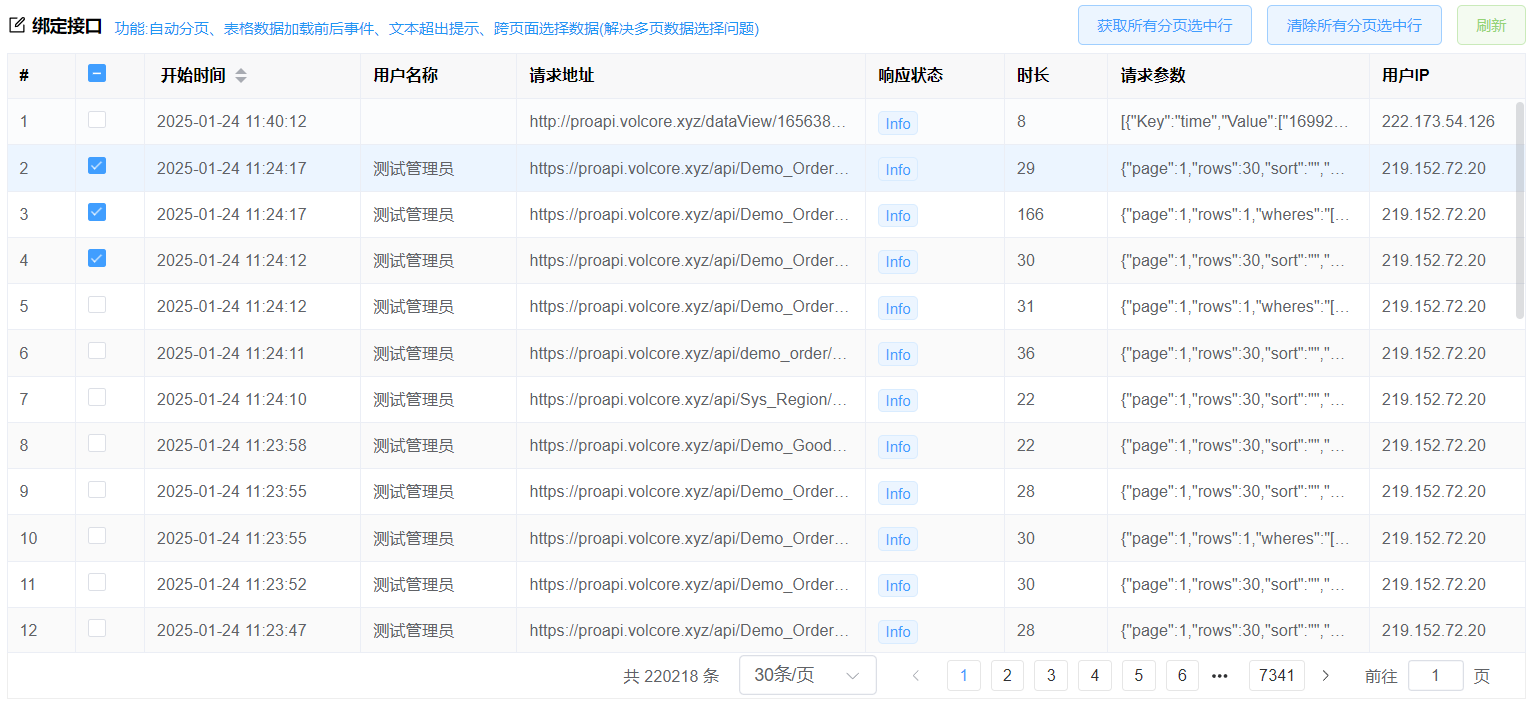
查看代码
前端代码
<template>
  <div class="table-item">
    <div class="table-item-header">
      <vol-title icon="edit" title="绑定接口">功能:自动分页、表格数据加载前后事件、文本超出提示、跨页面选择数据(解决多页数据选择问题)</vol-title>
      <div class="table-item-buttons">
        <div>
          <el-button type="primary" @click="getSelected" plain >获取所有分页选中行</el-button>
          <el-button type="primary" @click="clearSelection" plain>清除所有分页选中行</el-button>
          <el-button type="primary" @click="reload" color="#95d475" plain>刷新</el-button>
        </div>
      </div>
    </div>
    <!--
       1、必须设置row-key与reserveSelection属性后才能分页选择数据
       2、row-key为表格数据的唯一值字段(尽量是主键id字段)
       3、reserveSelection是否显示分页选中的数据
     -->
    <!--*********如果不需要跨页面选择数据,请去掉 row-key、reserveSelection 属性******-->
    <vol-table
      row-key="Id" :reserveSelection="true"
      ref="tableRef"  :url="url"
      index  :columns="columns"
      :height="maxHeight" :pagination-hide="false"
      :load-key="true" :column-index="true"
      @loadBefore="loadBefore" @loadAfter="loadAfter"
    ></vol-table>
  </div>
</template>
<script lang="jsx" setup>
import VolTable from "@/components/basic/VolTable.vue";
import { ref, reactive, getCurrentInstance } from "vue";
const { proxy } = getCurrentInstance();
const tableRef = ref();
//计算表格高度
const maxHeight = ref(0);
maxHeight.value = document.body.clientHeight - 250;
//使用生成的接口返回数据,也可以自定义接口返回,见接口代码
const url = ref("api/sys_log/getPageData");
//获取选中
const getSelected = () => {
  const rows = tableRef.value.getSelected();
  if (!rows.length) { return proxy.$message.error("请选中行");}
  proxy.$message.success(`共选中【${rows.length}】行`);
};
//清除选中
const clearSelection = () => {
  tableRef.value.clearSelection();
  proxy.$message.success("清除成功");
};
//表格数据加载前事件
const loadBefore = async (param, callBack) => {
  //这里可以异步调用接口后再接着后面的操作
  // await proxy.http
  //   .post("api/sys_log/getpagedata", { rows: 200, page: 1 }, true)
  //   .then((x) => {});

  //设置查询条件
  let wheres = [
    {
      name: "字段名1",
      value: "查询的值",
      displayType: "like",
      //displayType查询类型可选值:
      //like        模糊查询
      //selectList  多选,对应sql的where xxx in (1,2,3)
      //thanorequal 大于等于
      //gt          大于
      //lessorequal 小于等于
      //lt          小于
      //in          对应sql的where xxx in (1,2,3)
      //notIn       对应sql的where xxx not in (1,2,3)
      //其他类型请在后台的查询方法设置
    },
    {
      name: "字段名2",
      value: "value1,value2", //多选查询值是逗号隔开
      displayType: "selectList",
    },
  ];
  param.wheres.push(...wheres);
  // param.url='api/xx/xx';这里也可以重新设置url
  param.value = "xx"; //也可以自定义任何值,在后表[表service类]中重写查询getPageData方法options.value直接获取
  await callBack(true); //返回false,界面上不会显示
};
//表格数据加载后事件
const loadAfter = (rows, callBack, result) => {
  //rows返回的数据
  //注意不要设置rows=xx,这样会改变数据的内存地址导致修改的值无效
  callBack(true); //返回false,界面上不会显示
};
const reload = () => {
  tableRef.value.load();
  //刷新不分页:tableRef.value.load(null,false);
};
//接口返回数据,可以框架生成的接口getPageData
//如果是自定义的接口,需要返回的数据格式:{total:100,rows:[]}
const columns = reactive([
  { field: "BeginDate", title: "开始时间",width: 120,sort: true },
  { field: "UserName",title: "用户名称", width: 90},
  { field: "Url",title: "请求地址",width: 200,showOverflowTooltip: true}, //设置超出鼠标放上去提示
  {field: "RequestParameter", title: "请求参数", width: 150,showOverflowTooltip: true},//设置超出鼠标放上去提示
  { field: "UserIP", title: "用户IP", width: 90 },
]);
</script>
<style lang="less" scoped>
.table-item-header {
  display: flex;
  padding: 6px 0;
  .table-item-buttons {
    margin-left: auto;
  }
}
</style>
后台接口代码
如果需要增加查询条件与自定义接口返回表格数据,见下面[表单+查询+合并单元格]后台接口配置示例后台接口代码