
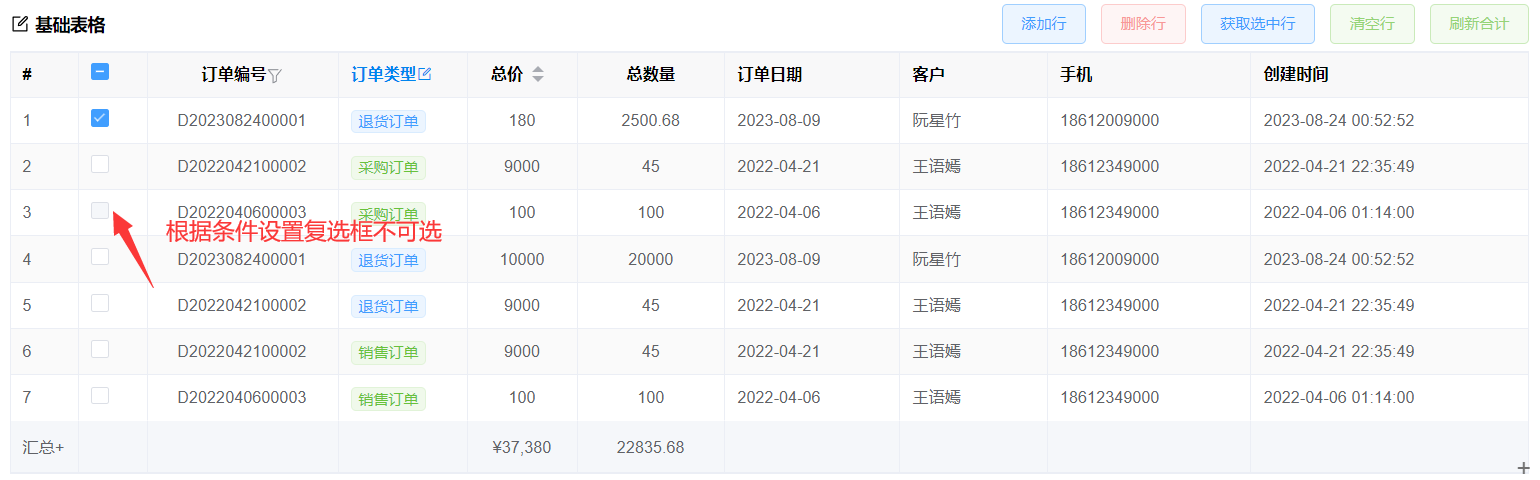
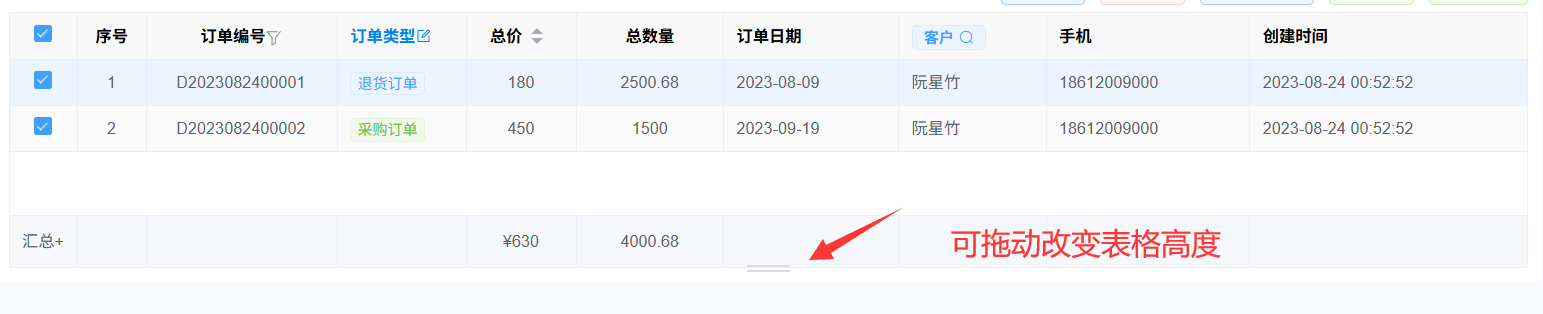
1.功能:自动绑定数据源、自定义合计格式、(行单击、双击、复选框)事件、设置默认选中行、拖拽行排序、表头筛选、固定列、文本居中、文本超出换行显示、超出提示信息、自定义表头、行号、复选框、禁用复选框选中、拖动右下角改变高度
- 预览地址 基础表格
表格拖动改变高度
查看代码
<template>
  <div class="table-item">
    <div class="table-item-header">
      <vol-title icon="edit" title="基础表格"></vol-title>
      <div class="table-item-buttons">
          <el-button type="primary" @click="addRow" plain>添加行</el-button>
          <el-button type="primary" @click="delRow" color="#f89898" plain>删除行</el-button>
          <el-button type="primary" @click="getRow" plain>获取选中行</el-button>
          <el-button type="primary" @click="clearRow" color="#95d475" plain >清空行</el-button>
          <el-button type="primary" @click="updateSummary" color="#95d475" plain >刷新合计</el-button
          >
      </div>
    </div>
    <!--ck:显示复选框
        column-index:显示行号
        single:只否单选
        drag-position:表格可拖动改变高度
        table-data:表格数据
        columns:表格配置
        max-height:表格最大高(也可以设置为:height="maxHeight"固定高度)
        sortable:表格拖动排序
        onSortEnd:表格拖动排序结束事件
        text-inline:文本超出换行显示
        pagination-hide:隐藏分页
        rowClick:行点击事件
        rowDbClick:行点双击事件
        selectionChange:复选框选择事件
        selectable:复选框checkbox是否可以选中-->
    <vol-table
      ref="tableRef" ck column-index :single="false" drag-position="bottom"
      :table-data="tableData"  :columns="columns" :max-height="maxHeight"
      :sortable="true" @onSortEnd="onSortEnd" :text-inline="false" :pagination-hide="true"
      @rowClick="rowClick" @rowDbClick="rowDbClick" @selectionChange="selectionChange"
      :selectable="selectable"
    ></vol-table>
  </div>
</template>
<script setup>
import VolTable from "@/components/basic/VolTable.vue";
import { ref, reactive, getCurrentInstance, nextTick } from "vue";
const { proxy } = getCurrentInstance();
const tableRef = ref();
const maxHeight = ref(0);
//计算表格高度:屏幕高度减去其他标签高度
maxHeight.value = document.body.clientHeight - 236;
const getRow = () => {
  const rows = tableRef.value.getSelected();
  if (!rows.length) {proxy.$message.error("请选中行");return; }
  proxy.$message.success(JSON.stringify(rows));
};
//添加行
const addRow = () => {
  //tableData.push({ OrderNo: "D2022040600009" });
  tableRef.value.addRow({ OrderNo: "D2022040600009" });
};
//删除行
const delRow = () => {
  tableRef.value.delRow();
  proxy.$message.success("删除成功");
};
const clearRow = () => {
  tableData.splice(0);
  proxy.$message.success("数据已清空");
};
//表格拖动结束事件
const onSortEnd = (rows, newIndex, oldIndex) => {
  //rows表格数据,可循环rows修改行的值
  proxy.$message.info("拖动排序结束");
};
//行点击
const rowClick = ({ row, column, event, index }) => {
  proxy.$message.info(`点击了第[${index}行]`);
};
//行双击
const rowDbClick = ({ row, column, event, index }) => {
  proxy.$message.info(`双击了第[${index}行]`);
};
//勾选事件
const selectionChange = (rows) => {
  proxy.$message.info(`勾选事件`);
};
//刷新合计
const updateSummary = () => {
  tableRef.value.initSummary();
  //刷新指定字段的合计信息
  //tableRef.value.updateSummary(["字段1", "字段2"]);
  proxy.$message.info(`刷新合计成功`);
};
//设置默认选中第一行(如果是接口返回的数据,写loadAfter方法后面,见绑定接口)
nextTick(() => {
  tableRef.value.toggleRowSelection(tableData[0]);
});
//禁用复选框不可选
const selectable = (row, index) => {
  //可根据row.字段判断
  return index !== 2;
};
//表格配置
const columns = reactive([
  { field: "Order_Id", title: "Order_Id", type: "guid", width: 110, hidden: true },
  {
    field: "OrderNo",title: "订单编号",
    filterData: true, //开启筛选
    showOverflowTooltip: true, //内容超出时鼠标放上去提示文本
    align: "center", //居中显示:center,居左显示:left,靠右显示:right
    fixed: true, //固定列, 如果固定到右边,true改为"right"
    width: 100,
  },
  {
    field: "OrderType",title: "订单类型",titleStyle: "color:#0085ee", //标题样式
    tip: {
      //自定义表头提示
      text: "自定表头提示",icon: "el-icon-edit-outline",color: "#0085ee", //图标颜色
      click: () => { proxy.$message.success("点击了表头")}//图标点击事件
    },
    type: "int", bind: { key: "订单类型", data: [] }, width: 70,
  },
  {
    field: "TotalPrice",  title: "总价",  type: "decimal", summary: true, width: 60,
    sort: true, //排序
    align: "center",
    summaryFormatter: (val, col, data, summaryData) => {
      //自定义格式化合计显示
      if (!val) {return "";}
      summaryData[0] = "汇总+"; //自定义合计名称
      //自定义合计值的格式
      val = (val + "").replace(/\d{1,3}(?=(\d{3})+(\.\d*)?$)/g, "$&,");
       "¥" + val;
    },
  },
  {
    field: "TotalQty", title: "总数量", type: "int",
    summary: true, //开启合计
    numberLength: 2, //保留两位小数
    width: 80, align: "center",
  },
  { field: "OrderDate", title: "订单日期", type: "date", width: 95 }, //如果要显示日期时分秒改为type: "datetime"
  { field: "CreateDate", title: "创建时间", type: "datetime", width: 150 },
]);
//表格数据
const tableData = reactive([
  {
    OrderNo: "D2023082400001",
    OrderType: 3,
    TotalPrice: 180,
    TotalQty: 2500.68,
    OrderDate: "2023-08-09 00:00:00",
    CustomerId: null,
    Customer: "阮星竹",
    PhoneNo: "18612009000",
    OrderStatus: 3,
    Remark: null,
    CreateDate: "2023-08-24 00:52:52",
  }
]);
</script>
<style lang="less" scoped>
.table-item-header {
  display: flex;
  padding: 6px 0;
  .table-item-buttons {
    margin-left: auto;
  }
}
.small-text {
  font-size: 12px;
  color: #2196f3;
  padding-top: 10px;
  position: relative;
  top: 2px;
}
</style>