
1.功能:按条件编辑、编辑事件、api加载数据、自动分页、图片显示及文件上传、下拉框、输入回车框事件、下拉table、自定义按钮等
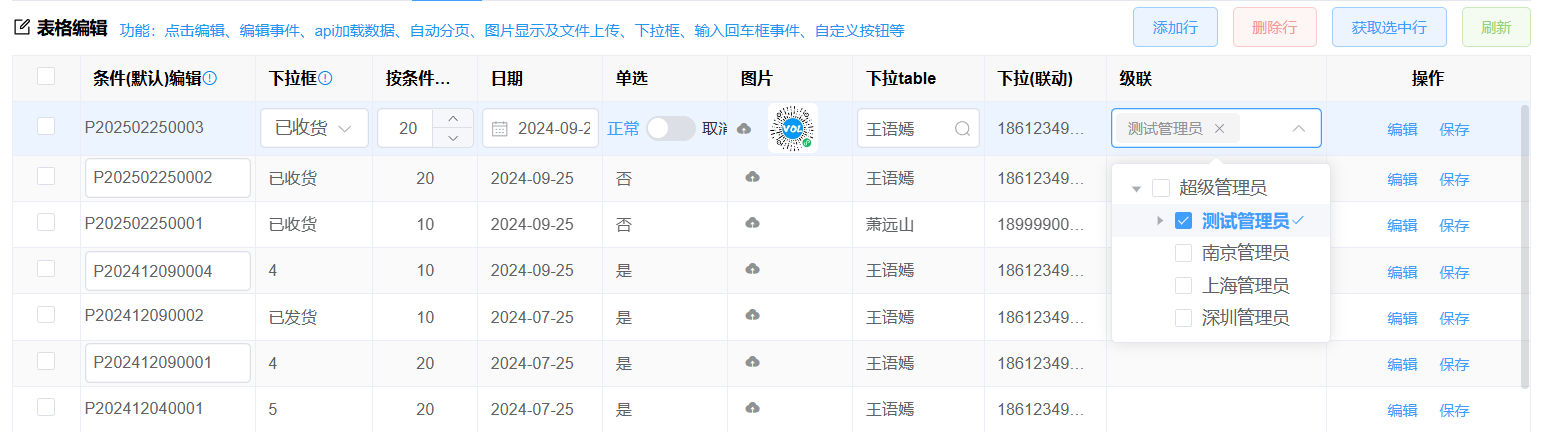
查看代码
前端代码
<template>
  <div class="table-item">
    <div class="table-item-header">
      <vol-title icon="edit" title="表格编辑">功能:点击编辑、编辑事件、api加载数据、自动分页、图片显示及文件上传、下拉框、输入回车框事件、自定义按钮等</vol-title>
      <div class="table-item-buttons">
          <el-button type="primary" @click="addRow" plain>添加行</el-button>
          <el-button type="primary" @click="delRow" color="#f89898" plain>删除行</el-button>
          <el-button type="primary" @click="getRow" plain>获取选中行</el-button>
          <el-button type="primary" @click="reload" color="#95d475" plain>刷新</el-button>
      </div>
    </div>
    <!--  beginEdit:表格进入编辑事件 endEditBefore:表格行编辑结束事件 -->
    <vol-table
      ref="tableRef"
      :url="url"
      :ck="true"
      :columns="columns"
      :max-height="maxHeight"
      :pagination-hide="false"
      :load-key="true"
      :column-index="false"
      :beginEdit="beginEdit"
      :endEditBefore="endEditBefore"
    ></vol-table>
  </div>
</template>
<script lang="jsx" setup>
import VolTable from "@/components/basic/VolTable.vue";
import { ref, reactive, getCurrentInstance } from "vue";
const { proxy } = getCurrentInstance();
const tableRef = ref();
//计算表格高度
const maxHeight = ref(0);
maxHeight.value = document.body.clientHeight - 250;
//接口返回数据,可以框架生成的接口getPageData
//如果是自定义的接口,需要返回的数据格式:{total:100,rows:[]}
const url = ref("api/Demo_Order/getPageData");
//点击行进入编辑事件
const beginEdit = (row, column, index) => {
  //进入编辑时,这里可以根据编辑的row行数据,设置表格字段只读或编辑
  // columns.forEach(x=>{
  //   if (x.field=='字段') {
  //      x.readonly=row.判断字段=='值'
  //   }
  // })
  return true; //false不会进入编辑
};
//行编辑结束事件
const endEditBefore = (row, column, index) => {
  //结束编辑时
  proxy.$message.success("第" + (index + 1) + "行结束编辑");
  return true; //false不会结束编辑
};
//获取选中的行
const getRow = () => {
  const rows = tableRef.value.getSelected();
  if (!rows.length) {proxy.$message.error("请选中行");return;}
  proxy.$message.success(JSON.stringify(rows));
};
const addRow = () => {
  tableRef.value.addRow({ OrderNo: "D2022040600009" });
  //如果批量添加行。请使用:
  //tableRef.value.rowData.push(...[{ OrderNo: "D2022040600009" },{ OrderNo: "D2022040600009" }])
};
//删除行
const delRow = () => {
  tableRef.value.delRow();
  proxy.$message.success("删除成功");
};
//刷新表格数据
const reload = () => {
  tableRef.value.load(null, true);
  proxy.$message.success("刷新成功");
};
const columns = reactive([
  { field: "Order_Id", title: "Order_Id", type: "guid", width: 110, hidden: true }, //hidden隐藏字段
  {
    field: "OrderNo",
    title: "条件(默认)编辑",
    type: "string",
    width: 130,
    checkEdit: (row, column, index) => {
      //可根据row.字段的值返回true/false是否可以编辑
      // return row.字段=='值'
      return index % 2 == 1
    },
    tip: {
      //自定义表头提示
      text: "checkEdit中判断row的值是否可以编辑",
      icon: "el-icon-warning-outline",
      color: "#0085ee", //图标颜色
      click: () => {
        //图标点击事件
        proxy.$message.success("点击了表头");
      },
    },
    edit: { type: "text", keep: true }, //keep: true始终显示编辑,可以去掉这个属性
    onKeyPress: (row, column, $e) => {
      //输入框输入事件
      if ($e && $e.keyCode == 13) {
        proxy.$message.success("按了回车");
        //按回车跳转到下一行编辑
        //tableRef.value.toNextCell(row, "OrderNo", true);
        return;
      }
      //输的值
    },
    focus: (row, column, $event) => {
      //输入框获取焦点事件
      console.log("获取焦点");
    },
    blur: (row, column, $event) => {
      //输入框失去获取焦点事件
      console.log("失去焦点");
    },
  },
  {
    field: "OrderType",
    title: "下拉框",
    type: "int",
    tip: {
      //自定义表头提示
      text: "点击表格自动进入编辑",
      icon: "el-icon-warning-outline",
      color: "#0085ee", //图标颜色
      click: () => {
        //图标点击事件
        proxy.$message.success("点击了表头");
      },
    },
    bind: { key: "订单状态", data: [] },
    width: 90,
    edit: { type: "select" },
    //row:行数据,column字段配置,isClear是否清除,value:选中的值
    onChange: (row, column, isClear, value) => {
      //清除事件
      if (isClear) {
        return;
      }
      //获取选择的文本
      const txt = proxy.base.getColumnDicItem(columns, column.field, value).value;
      proxy.$message.success(`请选择了[${txt}]`);
      //下拉框选择时可以同时给其他字段设置:row.xx=row.字段;
    },
  },
  {
    field: "TotalQty",
    title: "按条件编辑",
    precision: 2, //precision小数位数
    type: "int",
    width: 80,
    align: "center",
    edit: { type: "number" }, //编辑类型number整数,decimal带小数
    onKeyPress: (row, column, $e) => {
      //绑定输入事件
    },
    //extra: { text: "%", style: "margin-left:5px;padding-top:4px;" },
  },
  {
    field: "OrderDate",
    title: "日期",
    type: "date", //year/month/datetime/date/time  编辑类型,年、月、日期时间分秒、日期、时间
    width: 95,
    edit: { type: "date" }, //year/month/datetime/date/time  编辑类型,年、月、日期时间分秒、日期、时间
    onChange: (row, column, isClear, value) => {
      //绑定日期选择事件
    },
  },
  {
    field: "OrderStatus",
    title: "单选",
    type: "switch",
    width: 95,
    edit: { type: "switch" },
    activeText: "取消",
    inactiveText: "正常",
    onChange: (value, row, column) => {
      //注意接口返回的这个字段必须要有值,否则会异常
      //proxy.$message.info(value + "");
    },
  },
  {
    field: "ImgUrl", //图片、文件上传事件
    title: "图片",
    type: "img", //上传类型可选img、excel、file
    width: 95,

    edit: {
      type: "img", //可选img、excel、file
       url: "api/Demo_Order/upload", //配置图片上传地址(默认api/表/upload即可)
      //fileTypes:['jpg','png','pdf'],//指定文件上传类型
      multiple: true, //多文件上传
      maxFile: 2, //最多可以上传3张照片
      maxSize: 5, //文件大小限制5M
      autoUpload: true, //自动上传
    },
    //选择文件时
    onChange: (files) => {
      console.log("选择文件事件");
      //此处不返回true,会中断代码执行
      return true;
    },
    uploadBefore: (files, params) => {
      //上传前方法
      console.log("上传前");
      //上传前可以自定义参数
      params.xx = "123";
      //上传前可以自定义参数,从编辑表单、或者当前编辑的行数据中获取

      // //从编辑的行数据中获取参数
      // params.xx =
      //后台重写【表service】类的中upload方法获取参数:
      //string val= Utilities.HttpContext.Current.Request.Query["xx"]
      return true;
    },
    //上传后方法
    uploadAfter: (files) => {
      console.log("上传后");
      return true;
    },
  },
  {
    field: "PhoneNo",
    title: "下拉(联动)",
    width: 90,
  },
  {
    field: "Price",
    title: "级联",
    type: "treeSelect",
    width: 130,
    multiple:true,//是否可以多选
    edit: { type: "treeSelect" },
    bind: {
      key: "tree_roles",
      data: [],
    },
  },
  {
    title: "操作",
    field: "操作",
    width: 80,
    align: "center", // 'center',
    render: (h, { row, column, index }) => {
      return (
        <div>
          <el-button
            link
            onClick={($e) => {
              //启表格编辑
              tableRef.value.setEdit(index);
            }}
            type="primary"
          >
            编辑
          </el-button>
          <el-button
            link
            onClick={($e) => {
              //结束编辑
              tableRef.value.setEdit(-1);
              //proxy.http调用接口保存数据
            }}
            type="primary"
          >
            保存
          </el-button>
        </div>
      );
    },
  },
]);
</script>
<style lang="less" scoped>
.table-item-header {
  display: flex;
  padding: 6px 0;
  .table-item-buttons {
    margin-left: auto;
  }
}
</style>