
1.功能:单元格格式化、单元格颜色、整行背景颜色、文字提示
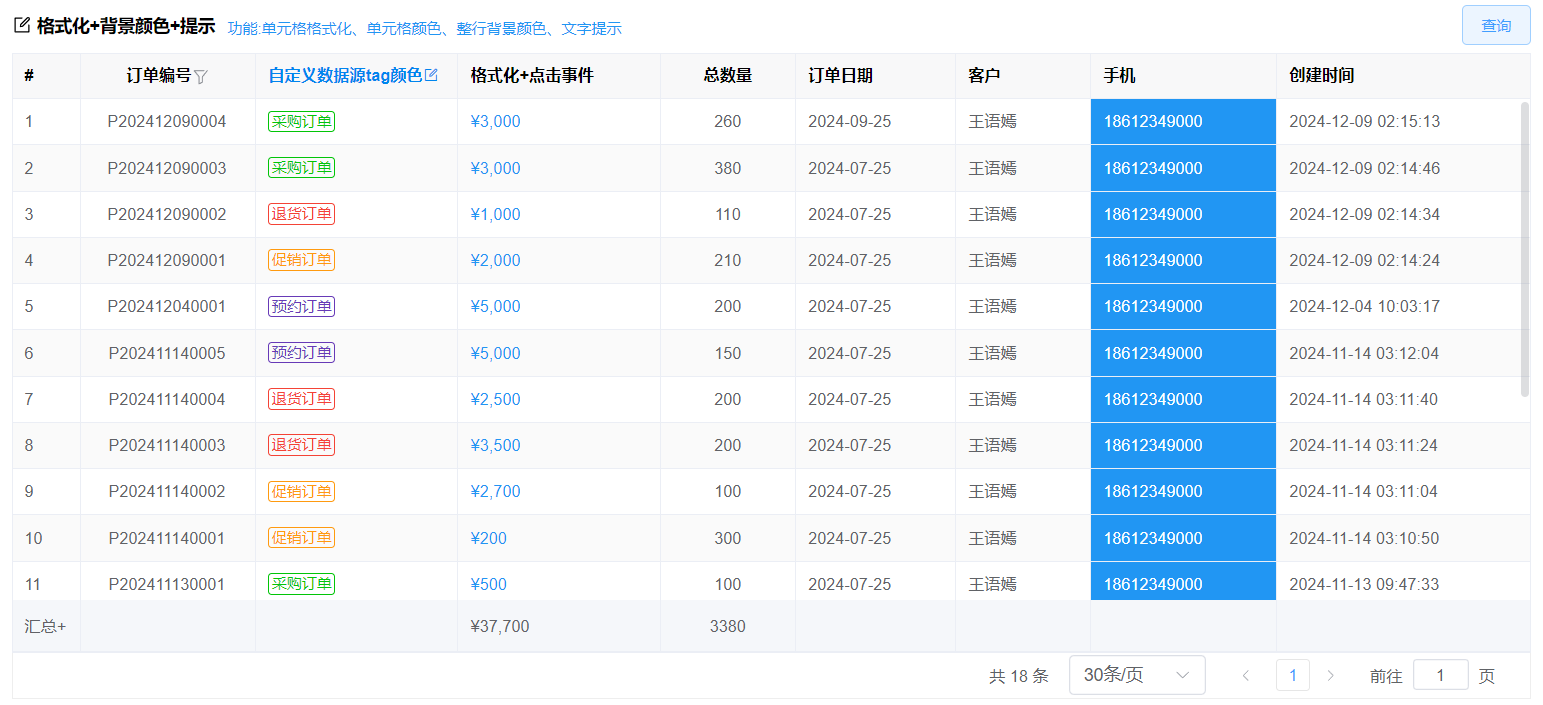
查看代码
前端代码
<template>
  <div class="table-item">
    <div class="table-item-header">
      <vol-title icon="edit" title="格式化+背景颜色+提示"> 功能:单元格格式化、单元格颜色、整行背景颜色、文字提示</vol-title >
      <div class="table-item-buttons"> <el-button type="primary" @click="search" plain>查询</el-button></div>
    </div>
	  <!-- 如果是手动绑定table数据,见:【基础表格+事件处理】-->
    <vol-table
      ref="tableRef"
      :ck="false"
      column-index
      :columns="columns"
      :max-height="maxHeight"
      :url="url"
      :pagination-hide="false"
    ></vol-table>
  </div>
</template>
<script setup>
import VolTable from "@/components/basic/VolTable.vue";
import { ref, reactive, getCurrentInstance } from "vue";
const { proxy } = getCurrentInstance();
const tableRef = ref();
const formRef = ref();
const maxHeight = ref(0);
//计算表格高度:屏幕高度减去其他标签高度
maxHeight.value = document.body.clientHeight - 250;
const url = ref("api/Demo_Order/getPageData");
const search = () => {
  tableRef.value.load();
};
//表格配置及格式化
const columns = reactive([
  { field: "Order_Id", title: "Order_Id", type: "guid", width: 110, hidden: true },
  {
    field: "OrderNo",
    title: "订单编号",
    filterData: true, //开启筛选
    showOverflowTooltip: true, //内容超出时鼠标放上去提示文本
    align: "center", //居中显示:center,居左显示:left,靠右显示:right
    fixed: true, //固定列, 如果固定到右边,true改为"right"
    width: 100,
  },
  {
    field: "OrderType",
    title: "自定义数据源tag颜色",
    titleStyle: "color:#0085ee", //标题样式
    width: 120,
    type: "int",
    bind: { key: "订单类型", data: [] },
    tip: {
      //自定义表头提示
      text: "自定义数据源tag颜色",
      icon: "el-icon-edit-outline",
      color: "#0085ee", //图标颜色
      click: () => {
        //图标点击事件
        proxy.$message.success("点击了表头");
      },
    },
    //设置table有数据源的列为正常显示(并设置自定义文字颜色)
    normal: true,
    getStyle: (row, column) => {
      //自定义数据源tag颜色
      let color;
      if (row.OrderType == 1) {
        color = "#ff4949";
      } else if (row.OrderType == 2) {
        color = "rgb(1 197 8)";
      } else if (row.OrderType == 3) {
        color = "#F44336";
      } else if (row.OrderType == 4) {
        color = "#ff9a0f";
      } else {
        color = "#673AB7";
      }

      return {
        color: color,
        // background: "rgb(255 242 242)",
        border: "1px solid " + color,
        padding: "1px 2px",
        fontSize: "12px",
        "border-radius": "3px",
      };
    },
  },
  {
    field: "TotalPrice",
    title: "格式化+点击事件",
    type: "decimal",
    summary: true,
    width: 120,
    formatter: (row, column) => {
      //格式化要显示的内容
      //格式化配置
      let color = "";
      if (row.TotalPrice > 5000) {
        color = "#f01d0d";
      } else {
        color = "#2196f3";
      }
      return `<a style='color:${color}'>¥${(row.TotalPrice + "").replace(
        /\d{1,3}(?=(\d{3})+(\.\d*)?$)/g,
        "$&,"
      )}</a>`;
    },
    click: (row, column) => {
      //绑定点击事件
      proxy.$message.success("点击了" + row.TotalPrice);
    },
    summaryFormatter: (val, col, data, summaryData) => {
      //自定义格式化合计显示
      if (!val) {
        return "";
      }
      summaryData[0] = "汇总+"; //自定义合计名称
      //自定义合计值的格式
      val = (val + "").replace(/\d{1,3}(?=(\d{3})+(\.\d*)?$)/g, "$&,");
      return "¥" + val;
    },
  },
  {
    field: "TotalQty",
    title: "总数量",
    type: "int",
    summary: true, //开启合计
    numberLength: 2, //保留两位小数
    width: 80,
    align: "center",
  },
  { field: "OrderDate", title: "订单日期", type: "date", width: 95 }, //如果要显示日期时分秒改为type: "datetime"
  { field: "Customer", title: "客户", type: "string", width: 80 },
  {
    field: "PhoneNo",
    title: "手机",
    type: "string",
    width: 110,
    cellStyle: (row, rowIndex, columnIndex) => {
      //指定某个字段设置背景颜色
      //这里可以根据row.字段来判断设置整行的样式
      //if (row.字段=='值') {
      return { background: "#2196F3", color: "#fff" }; //, color: "#fff" 字体颜色
      //}
    },
  },
  { field: "CreateDate", title: "创建时间", type: "datetime", width: 150 },
]);

//指定整行设置背景颜色
// columns.forEach((x) => {
//   //设置过的不再设置
//   if (x.cellStyle) {
//     return;
//   }
//   x.cellStyle = (row, rowIndex, columnIndex) => {
//     //这里可以根据row.字段来判断设置整行的样式
//     if (row.elementIndex === 1) {
//       return { background: "#2196F3", color: "#fff" }; //, color: "#fff" 字体颜色
//     }
//   };
// });
</script>

<style lang="less" scoped>
.table-item-header {
  display: flex;
  padding: 6px 0;
  .table-item-buttons {
    margin-left: auto;
  }
}
</style>
后台接口代码
`如果需要增加查询条件与自定义接口返回表格数据,见下面[表单+查询+合并单元格]后台接口配置示例`
[后台接口代码](/docs/table/search.md)