
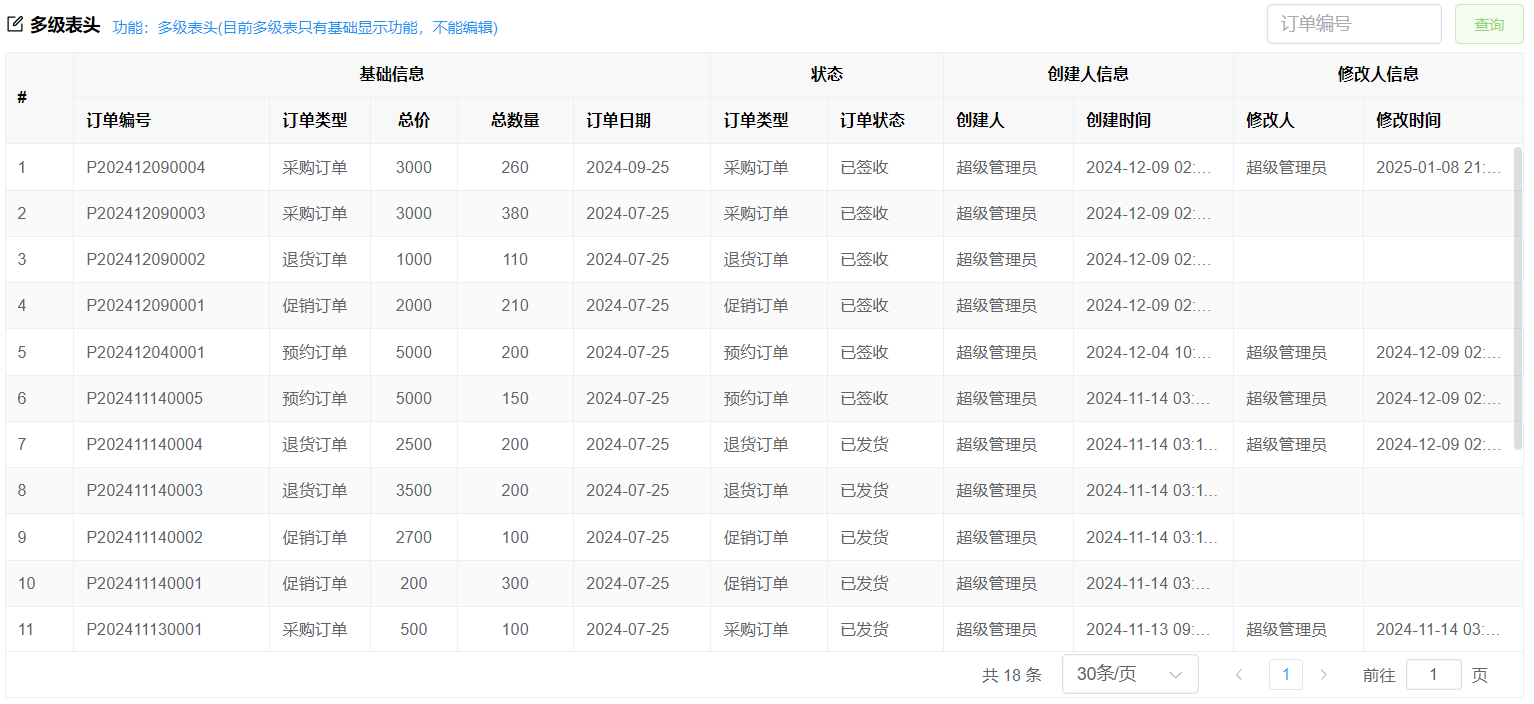
查看代码
前端代码
<template>
  <div class="table-item">
    <div class="table-item-header">
      <div class="table-item-border"></div>
      <vol-title icon="edit" title="多级表头">功能:多级表头(目前多级表只有基础显示功能,不能编辑)</vol-title>
      <div class="table-item-buttons">
          <el-input style="width: 140px; margin-right: 10px" v-model="orderNo" placeholder="订单编号"></el-input>
          <el-button type="primary" @click="search" color="#95d475" plain>查询</el-button>
      </div>
    </div>
    <!-- 如果是手动绑定table数据,见:【基础表格+事件处理】-->
    <vol-table
      @loadBefore="loadBefore"
      @loadAfter="loadAfter"
      ref="tableRef"
      :url="url"
      index
      :columns="columns"
      :max-height="maxHeight"
      :pagination-hide="false"
      :load-key="true"
      :ck="false"
      :column-index="true"
    ></vol-table>
  </div>
</template>
<script lang="jsx" setup>
import VolTable from "@/components/basic/VolTable.vue";
import { ref, reactive, getCurrentInstance } from "vue";
const { proxy } = getCurrentInstance();
const tableRef = ref();
//接口返回数据,可以框架生成的接口getPageData
//如果是自定义的接口,需要返回的数据格式:{total:100,rows:[]}
const url = ref("api/Demo_Order/getPageData");
//计算表格高度
const maxHeight = ref(0);
maxHeight.value = document.body.clientHeight - 250;
const orderNo = ref();

const loadBefore = (params, callBack) => {
  //调用后台接口前处理
  //设置查询条件
  params.wheres.push({
    name: "OrderNo",
    value: orderNo,
    displayType: "like", //模糊查询
  });

  //也可以给value设置值,后台自己解析
  // params.value=orderNo.value

  callBack(true); //false不会调用后台接口
};
//查询后方法
const loadAfter = (rows, callBack, result) => {
  callBack(true);
};

const search = () => {
  tableRef.load({}, true);
  proxy.$message.success("查询成功");
};

const columns = reactive([
  {
    field: "基础信息",
    title: "基础信息",
    type: "string",
    align: "center",
    children: [
      { field: "OrderNo", title: "订单编号", type: "string", width: 130 },
      {
        field: "OrderType",
        title: "订单类型",
        type: "int",
        bind: { key: "订单类型", data: [] },
        width: 70,
      },
      {
        field: "TotalPrice",
        title: "总价",
        type: "decimal",
        width: 60,
        align: "center",
      },
      {
        field: "TotalQty",
        title: "总数量",
        type: "int",
        width: 80,
        align: "center",
      },
      { field: "OrderDate", title: "订单日期", type: "date", width: 95 },
    ],
  },
  {
    field: "状态",
    title: "状态",
    type: "string",
    align: "center",
    children: [
      {
        field: "OrderType",
        title: "订单类型",
        type: "int",
        bind: { key: "订单类型", data: [] },
        width: 80,
      },
      {
        field: "OrderStatus",
        title: "订单状态",
        type: "int",
        bind: { key: "订单状态", data: [] },
        width: 80,
      },
    ],
  }
]);
</script>
<style lang="less" scoped>
.table-item-header {
  display: flex;
  padding: 6px 0;
  .table-item-buttons {
    margin-left: auto;
  }
}
</style>
后台接口代码
如果需要增加查询条件与自定义接口返回表格数据,见下面[表单+查询+合并单元格]后台接口配置示例后台接口代码