
1.功能:使用render自定义显示任意内容、按钮、数据源转换及tag颜色
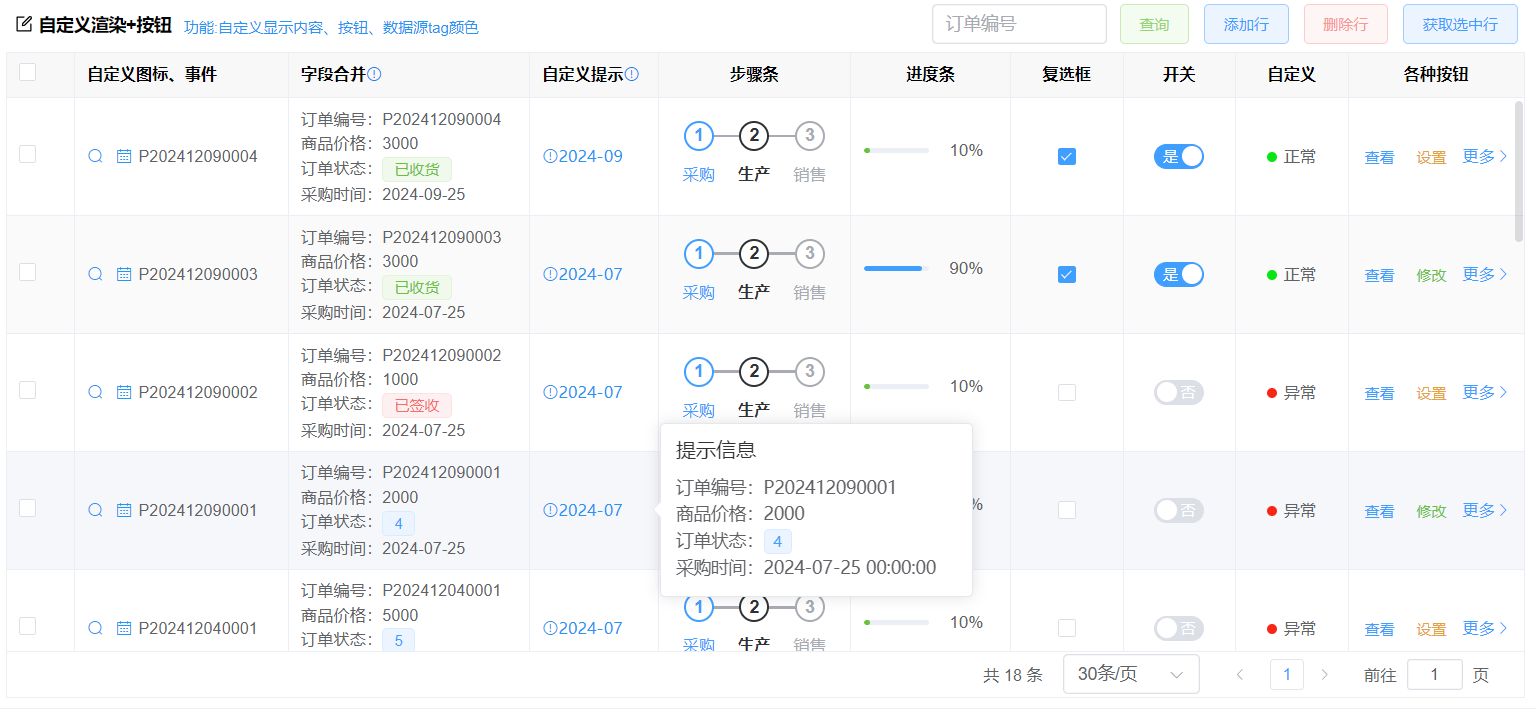
查看代码
前端代码
<template>
  <div class="table-item">
    <div class="table-item-header">
      <vol-title icon="edit" title="自定义渲染+按钮">功能:自定义显示内容、按钮、数据源tag颜色</vol-title>
      <div class="table-item-buttons">
          <el-input style="width: 140px; margin-right: 10px" v-model="orderNo"placeholder="订单编号"></el-input>
          <el-button type="primary" @click="search" color="#95d475" plain>查询</el-button>
          <el-button type="primary" @click="addRow" plain>添加行</el-button>
          <el-button type="primary" @click="delRow" color="#f89898" plain>删除行</el-button>
          <el-button type="primary" @click="getSelected" plain>获取选中行</el-button>
      </div>
    </div>
    <vol-table
      @loadBefore="loadBefore"
      @loadAfter="loadAfter"
      ref="tableRef"
      :url="url"
      index
      :columns="columns"
      :max-height="maxHeight"
      :pagination-hide="false"
      :load-key="true"
      :column-index="false"
    ></vol-table>
  </div>
</template>

<script lang="jsx" setup>
import VolTable from "@/components/basic/VolTable.vue";
import { ref, reactive, getCurrentInstance } from "vue";
const { proxy } = getCurrentInstance();
const tableRef = ref();
//计算表格高度
const maxHeight = ref(0);
maxHeight.value = document.body.clientHeight - 250;
//使用生成的接口返回数据,也可以自定义接口返回,见接口代码
const url = ref("api/demo_order/getPageData");
const orderNo = ref("");
//获取选中行
const getSelected = () => {
  const rows = tableRef.value.getSelected();
  if (!rows.length) {
    return proxy.$message.error("请选中行");
  }
  proxy.$message.success(`共选中【${rows.length}】行`);
};
//添加行
const addRow = () => {
  tableRef.value.addRow({ OrderNo: "D2022040600009" });
  //如果批量添加行。请使用:
  //tableRef.value.rowData.push(...[{ OrderNo: "D2022040600009" },{ OrderNo: "D2022040600009" }])
};
//删除行
const delRow = () => {
  tableRef.value.delRow();
  proxy.$message.success("删除成功");
};
const search = () => {
  tableRef.value.load(null, true);
  proxy.$message.success("查询成功");
};
//加载表格查询前方法
const loadBefore = (params, callBack) => {
  //调用后台接口前处理
  //设置查询条件,参数更多属性说明见:【绑定接口+跨页选择】
  params.wheres.push({
    name: "OrderNo",
    value: orderNo.value,
    displayType: "like", //模糊查询
  });
  //也可以给value设置值,后台自己解析
  // params.value=orderNo.value
  callBack(true); //false不会调用后台接口
};
//查询后方法
const loadAfter = (rows, callBack, result) => {
  //这里Enable设置只是测试数据,用于下面checkbox与radio单选显示,见下面说明,不要复制过去了
  rows.forEach((x, index) => {
    x.Enable = 0;
    x.Enable = index < 2 ? 1 : 0;
  });
  callBack(true);
};
const getTagName = (row) => {//手动设置数据源颜色
  // ["primary", "success", "info", "warning", "danger"]
  if (row.OrderType == 1) {
    return "primary";
  }
  if (row.OrderType == 2) {
    return "success";
  }
  if (row.OrderType == 3) {
    return "danger";
  }
  return "primary";
};

const columns = reactive([
  { field: "Order_Id", title: "Order_Id", type: "guid", width: 110, hidden: true },
  {
    field: "OrderNo",
    title: "自定义图标、事件",
    type: "string",
    width: 130,
    render: (h, { row, column, index }) => {
      return (
        <div>
          <i
            onClick={() => {
              //row当前行数据
              proxy.$message.success("点击了第1个图标");
            }}
            class="el-icon-search"
            style="color: #2196F3;"
          ></i>
          <i
            onClick={() => {
              //row当前行数据
              proxy.$message.success("点击了第3个图标");
            }}
            class="el-icon-date"
            style="margin-left:10px;color: #2196F3;"
          ></i>
          <span style="margin-left:5px">{row.OrderNo}</span>
        </div>
      );
    },
  },
  {
    field: "OrderType",
    title: "字段合并",
    type: "int",
    bind: { key: "订单状态", data: [] },
    width: 150,
    tip: {
      //自定义表头提示
      text: "多个字段合并显示减少字段列数",
      icon: "el-icon-warning-outline",
      color: "#0085ee", //图标颜色
      click: () => {
        //图标点击事件
        proxy.$message.success("点击了表头");
      },
    },
    render: (h, { row, column, index }) => {
      //proxy.base.getColumnDicItem转换数据字典显示文本
      return (
        <div style="line-height:1.5;padding:5px 0;">
          <div>订单编号:{row.OrderNo}</div>
          <div>商品价格:{row.TotalPrice}</div>
          <div>
            订单状态:
            <el-tag size="small" type={getTagName(row)}>
              {proxy.base.getColumnDicItem(columns, "OrderType", row.OrderType).value ||
                row.OrderType}
            </el-tag>
          </div>
          <div>采购时间:{(row.OrderDate || "").substr(0, 10)}</div>
        </div>
      );
    },
  },
  {
    field: "OrderDate",
    title: "自定义提示",
    width: 80,
    tip: {
      //自定义表头提示
      text: "鼠标放在表格上自动弹出提示",
      icon: "el-icon-warning-outline",
      color: "#0085ee", //图标颜色
      click: () => {
        //图标点击事件
        proxy.$message.success("点击了表头");
      },
    },
    render: (h, { row, column, index }) => {
	//自定义提示信息
      return (
        <el-popover placement="right" title="提示信息" width={250} trigger="hover">
          {{
            reference: () => (
                <i class="el-icon-warning-outline" style="color: #2196F3;">{(row.OrderDate || "").substr(0, 7)} </i>
            ),
            //自定义提示内容
            default: () => {
              return (
                <div style="line-height:1.5;">
                  <div>订单编号:{row.OrderNo}</div>
                  <div>商品价格:{row.TotalPrice}</div>
                  <div>
                    订单状态:
                    <el-tag size="small" type={getTagName(row)}>
                      {proxy.base.getColumnDicItem(columns, "OrderType", row.OrderType)
                        .value || row.OrderType}
                    </el-tag>
                  </div>
                  <div>采购时间:{row.OrderDate}</div>
                </div>
              );
            },
          }}
        </el-popover>
      );
    },
  },
  {
    field: "Customer",
    title: "步骤条",
    align: "center",
    width: 120,
    render: (h, { row, column, index }) => {
      //量多步骤条属性见:https://element-plus.org/zh-CN/component/steps.html
      return (
        //可以根据row的值动态生成步骤信息
        <el-steps style="max-width:200px;padding:10px 0" active={1} align-center>
          {[
            { title: "采购", desc: "采购描述" },
            { title: "生产", desc: "生产描述" },
            { title: "销售", desc: "销售描述" },
          ].map((c) => {
            return <el-step title={c.title} />;
          })}
        </el-steps>
      );
    },
  },
  {
    field: "PhoneNo",
    title: "进度条",
    align: "center",
    width: 100,
    render: (h, { row, column, index }) => {
      //  percentage={90} 实际应该修改为:row.字段
      if (index % 2 === 1) {
        //90改为row.字段
        return <el-progress stroke-width={4} percentage={90} />;
      }
      //10改为row.字段
      return (
        <el-progress stroke-width={4} color="#67c23a" show-text={true} percentage={10} />
      );
    },
  },
  {
    field: "Enable",
    title: "复选框",
    type: "int",
    width: 70,
    align: "center",
    render: (h, { row, column, index }) => {
      //注意:Enable表格数据的字段或者返回的字段,必须要有值,不能是null或者空,尽量是0/1,否则页面加载就会触发onChange
      //更多属性配置:https://element-plus.org/zh-CN/component/checkbox.html
      return (
        <el-checkbox
          true-value={1}
          false-value={0}
          v-model={row.Enable}
          onChange={(val) => {
            proxy.$message.success("选中事件" + val);
          }}
        ></el-checkbox>
      );
    },
  },
  {
    field: "Enable",
    title: "开关",
    type: "int",
    width: 70,
    align: "center",
    render: (h, { row, column, index }) => {
      //注意:Enable表格数据的字段或者返回的字段,必须要有值,不能是null或者空,尽量是0/1,否则页面加载就会触发onChange
      //更多属性配置:https://element-plus.org/zh-CN/component/c.html
      return (
        <el-switch
          active-value={1}
          inactive-value={0}
          v-model={row.Enable}
          inline-prompt
          active-text="是"
          inactive-text="否"
          onChange={(val) => {
            proxy.$message.success("选中事件" + val);
          }}
        ></el-switch>
      );
    },
  },
  {
    field: "Enable",
    title: "自定义",
    type: "int",
    width: 70,
    align: "center",
    render: (h, { row, column, index }) => {
      //注意:Enable表格数据的字段或者返回的字段,必须要有值,不能是null或者空,尽量是0/1
      //更多属性配置:https://element-plus.org/zh-CN/component/c.html
      return (
        <div>
          <span
            style={{
              width: "8px",
              height: "8px",
              display: "inline-block",
              borderRadius: "50%",
              marginRight: "5px",
              background: row.Enable ? "#0ae413" : "#f82616",
            }}
          ></span>
          {row.Enable ? "正常" : "异常"}
        </div>
      );
    },
  },
  {
    title: "各种按钮",
    field: "操作",
    width: 110,
    fixed: "right", //设置固定到右边,也可以固定到左边'left'
    align: "center", // 'center',
    render: (h, { row, column, index }) => {
      return (
        <div style="padding-right:10px;">
          <el-button
            onClick={($e) => {
              //row当前行数据
              proxy.$message.success("查看");
            }}
            type="primary"
            link
          >
            查看
          </el-button>

          {/* 通过条件判断,要显示的按钮 */}
          {/*  {
                                      index % 2 === 1
                                      ?<el-button>修改</el-button>
                                      : <el-button>设置</el-button>
                                  } */}

          {/* 通过v-show控制按钮隐藏与显示
                  下面的index % 2 === 1换成:row.字段==值 */}
          <el-button
            onClick={($e) => {
              //row当前行数据
              proxy.$message.success("修改");
            }}
            v-show={index % 2 === 1}
            type="success"
            link
          >
            修改
          </el-button>
          <el-button
            onClick={($e) => {
              //row当前行数据
              proxy.$message.success("设置");
            }}
            v-show={index % 2 === 0}
            type="warning"
            link
          >
            设置
          </el-button>

          <el-dropdown
            onClick={(value) => {
              this.dropdownClick(value);
            }}
            trigger="click"
            v-slots={{
              dropdown: () => (
                <el-dropdown-menu>
                  <el-dropdown-item>
                    <div
                      onClick={() => {
                        //row当前行数据
                        proxy.$message.success("京酱肉丝");
                      }}
                    >
                      京酱肉丝
                    </div>
                  </el-dropdown-item>
                  <el-dropdown-item>
                    <div
                      onClick={() => {
                        //row当前行数据
                        proxy.$message.success("驴肉火烧");
                      }}
                    >
                      驴肉火烧
                    </div>
                  </el-dropdown-item>
                </el-dropdown-menu>
              ),
            }}
          >
            <span
              style="font-size: 13px;color: #409eff;margin: 5px 0 0 10px;"
              class="el-dropdown-link"
            >
              更多<i class="el-icon-arrow-right"></i>
            </span>
          </el-dropdown>
        </div>
      );
    },
  },
]);
</script>
<style lang="less" scoped>
.table-item-header {
  display: flex;
  align-items: center;
  padding: 6px;
  .table-item-buttons {
    flex: 1;
    text-align: right;
  }
}
::v-deep(.el-step__title) {
  font-size: 13px !important;
}
::v-deep(.el-step__title) {
  font-size: 13px !important;
}
</style>
后台接口代码
如果需要增加查询条件与自定义接口返回表格数据,见下面[表单+查询+合并单元格]后台接口配置示例后台接口代码