
table显示switch切换操作
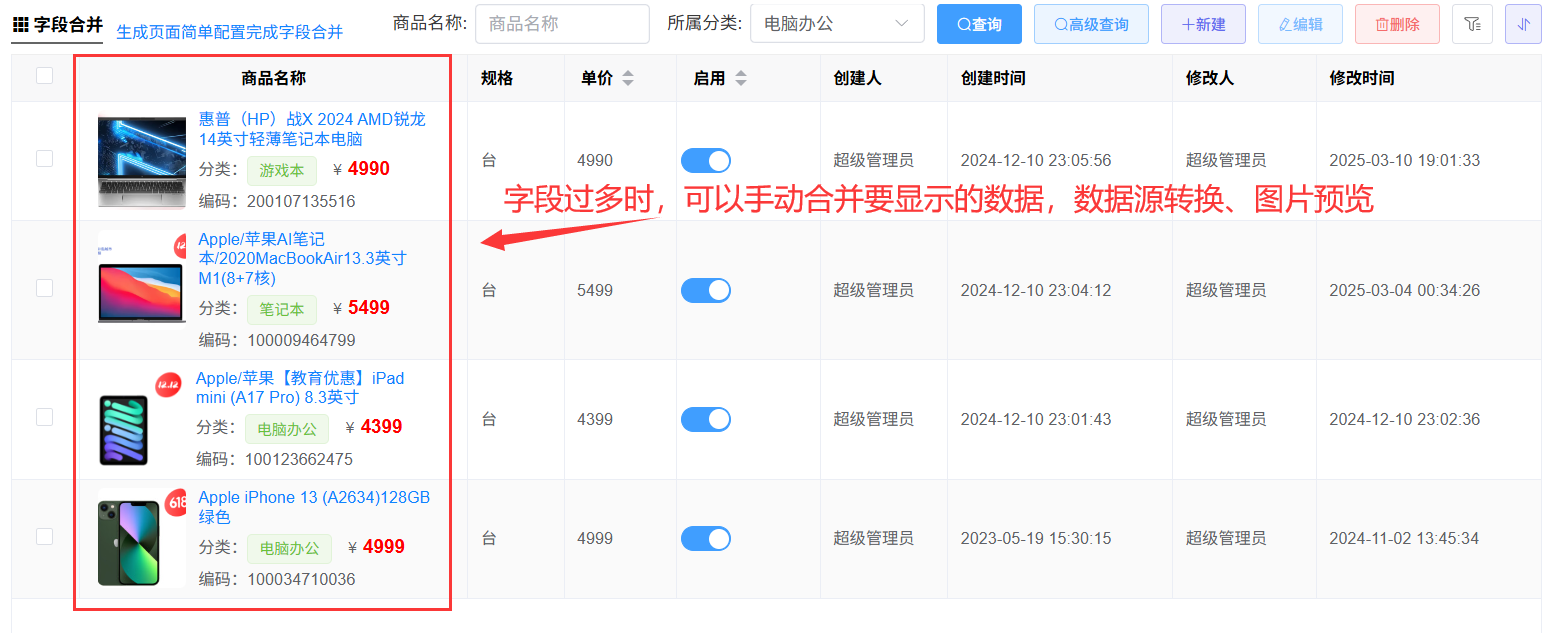
[vue3代码]写在生成的[表.vue]文件中,[vue2代码]写在[表.jsx]文件methods方法中;二选一实现
vue3代码
const viewImg=(row)=>{//预览图片
    gridRef.getTable(true).viewImg(row,{field:"ProductImage"});//img改为row行数据里面的字段
}
//手动转换分类字典的名称
const dicValue = (row, field) => {
    let catalog = ''
    const col = columns
        .find((c) => {
            return c.field == field//改为你的字段
        }).bind
    let item =
        (col.orginData || col.data).find((c) => {
            return c.key == row.CategoryId//改为你的字段
        })
    //获取转换的字典
    if (item) {
        catalog = item.value
    }
    return catalog;
}
const mergeData = () => {
    columns.forEach((x) => {
        //隐藏不需要显示的字段(下面的合并里面显示)
        if (['ProductImage', 'GoodsCode', 'Img'].includes(x.field)) {
            x.hidden = true
        }
        //给指定字段做合并显示
        if (x.field == 'ProductName') {
            x.width = 270;
            x.align = "center";
            x.render = (h, { row, column, index }) => {

                //自定义返回显示的内容、图片
                return (
                    <div style="display:flex;padding:5px;cursor: pointer;text-align: left;">
                        <img
                            onClick={() => { viewImg(row) }}
                            style="height: 80px;width:80px;border-radius: 5px;object-fit: cover;"
                            src={proxy.http.ipAddress + row.ProductImage}
                        />
                        <div style="line-height: 1.2;margin:0 10px;font-size: 13px;" onClick={() => { gridRef.edit(row) }}>
                            <div style="color: #0f84ff;margin-bottom:5px;font-weight:700">{row.ProductName}</div>
                            <el-tag style="font-size:11px;padding:0 5px;height: 20px;" type="error">{dicValue(row, 'CategoryId')}</el-tag>
                            <div style="margin:5px 0;">
                                <div>商品编码:{row.ProductCode}</div>
                                <div> 售价:<span style="margin-right:5px;font-size:12px;">¥</span>
                                    <span style="font-weight:bolder;color:red;font-size:15px;margin-right:10px;">{row.SellingPrice}</span>
                                    采购价:<span style="font-weight:bolder;color:red;font-size:15px;">{row.PurchasePrice}</span>
                                </div>
                            </div>
                        </div>
                    </div>
                )
            }
        }
    })
}
let gridRef;
//生成对象属性初始化
const onInit = async ($vm) => {
    gridRef = $vm;
    //在onInit中调用
    mergeData();
}
vue2代码
 viewImg(row){//预览图片
    this.$refs.table.viewImg(row,{field:"Img"});
 },
 onInited(){
      this.columns.forEach((x) => {
        //隐藏不需要显示的字段(下面的合并里面显示)
        if (['CatalogId', 'GoodsCode', 'Img'].includes(x.field)) {
          x.hidden = true
        }
        //给指定字段做合并显示
        if (x.field == 'GoodsName') {
          x.width = 240;
          x.align="center";
          x.render = (h, { row, column, index }) => {
            let catalog = row.CatalogId
            //手动转换分类的字典编号
            // let item = this.columns
            //   .find((c) => {
            //     return c.field == 'CatalogId'//改为你的字段
            //   })
            //   .bind.data.find((c) => {
            //     return c.key == row.CatalogId//改为你的字段
            //   })
            //  //获取转换的字典
            // if (item) {
            //   catalog = item.value
            // }
            //自定义返回显示的内容、图片
            return (
              <div style="display:flex;padding:5px;cursor: pointer;text-align: left;">
                <img
                 onClick={()=>{this.viewImg(row)}}
                  style="height: 80px;width:70px;border-radius: 5px;object-fit: cover;"
                  src={this.http.ipAddress + row.Img}
                />
                <div style="line-height: 1.2;margin:0 10px;font-size: 13px;" onClick={()=>{this.edit(row)}}>
                  <div style="color: #0f84ff;margin-bottom:5px;">{row.GoodsName}</div>
                  <div style="margin-bottom:5px;">
                       分类:<el-tag type="success">{catalog}</el-tag>{' '}
                    <span style="margin-left:10px;margin-right:5px;font-size:12px;">¥</span>
                    <span style="font-weight:bolder;color:red;font-size:15px;">{row.Price}</span>
                  </div>
                  <div>编码:{row.GoodsCode}</div>
                </div>
              </div>
            )
          }
        }
      })
}